Feature Flags as Change Control: LaunchDarkly, Unleash, Flagsmith
This comparison contains no affiliate links. Every capability claim comes from each vendor’s public documentation as of November 18, 2026, linked inline and in Sources. We did not test these products hands-on. The article discusses ServiceNow integrations; Ben Ennis works at ServiceNow (see his author page), and no vendor reviewed or paid for this piece.
Table of contents
- Why this matters
- What should a flag platform do to count as change control?
- How do the three platforms compare?
- LaunchDarkly: strongest ITSM handoff, most plan-gated
- Unleash: deepest approval workflow, mirror-only ITSM sync
- Flagsmith: solid gating, gaps at the edges
- How should a CAB classify flag changes?
- What to do about it
- FAQ
- Sources
Why this matters
A production flag change alters live behavior without a deployment. That is the point of flags, and it is also why they slip past change control. The pipeline gate, the pull request review and the change record all sit on the deploy path. A flag flip in a vendor dashboard sits on none of them.
Auditors care about the record either way. Our guide to SOC 2 change management audit questions covers the evidence they ask for on production changes, and Unleash’s own compliance mapping for the EU’s DORA rules frames a production flag change as an ICT change that needs approval and a record (Unleash). If your organization uses flags for deployment rings and staged rollouts, the flag platform is already part of your change system whether or not anyone wrote that down.
This comparison looks at three widely used platforms, LaunchDarkly, Unleash and Flagsmith, only through the lens a change manager or CAB cares about: can a change be forced through review, who can skip review, can it be scheduled for a window, what record survives, and how does it reach the ITSM tool. It is a documentation review. Where a vendor’s docs don’t say something, we say so instead of guessing.
What should a flag platform do to count as change control?
We scored each platform on nine questions drawn from common change-enablement practice (see our ITIL 4 change enablement explainer) and the audit evidence a reviewer asks for:
- Can approval be required before a production change takes effect?
- How many approvals can be required?
- Can a requester approve their own change?
- What is the documented bypass path, and who holds it?
- Are changes to targeting segments gated, not just flag values?
- Can an approved change be scheduled for a window?
- What change history is kept, for how long, and can it leave the tool?
- Is there a real reject or decline outcome?
- How does the change reach ServiceNow or another ITSM tool?
The bypass question matters most. Every platform has an emergency path, and it should. What a CAB needs to know is whether that path is a named permission it can audit or a side door that never generates a request.
How do the three platforms compare?
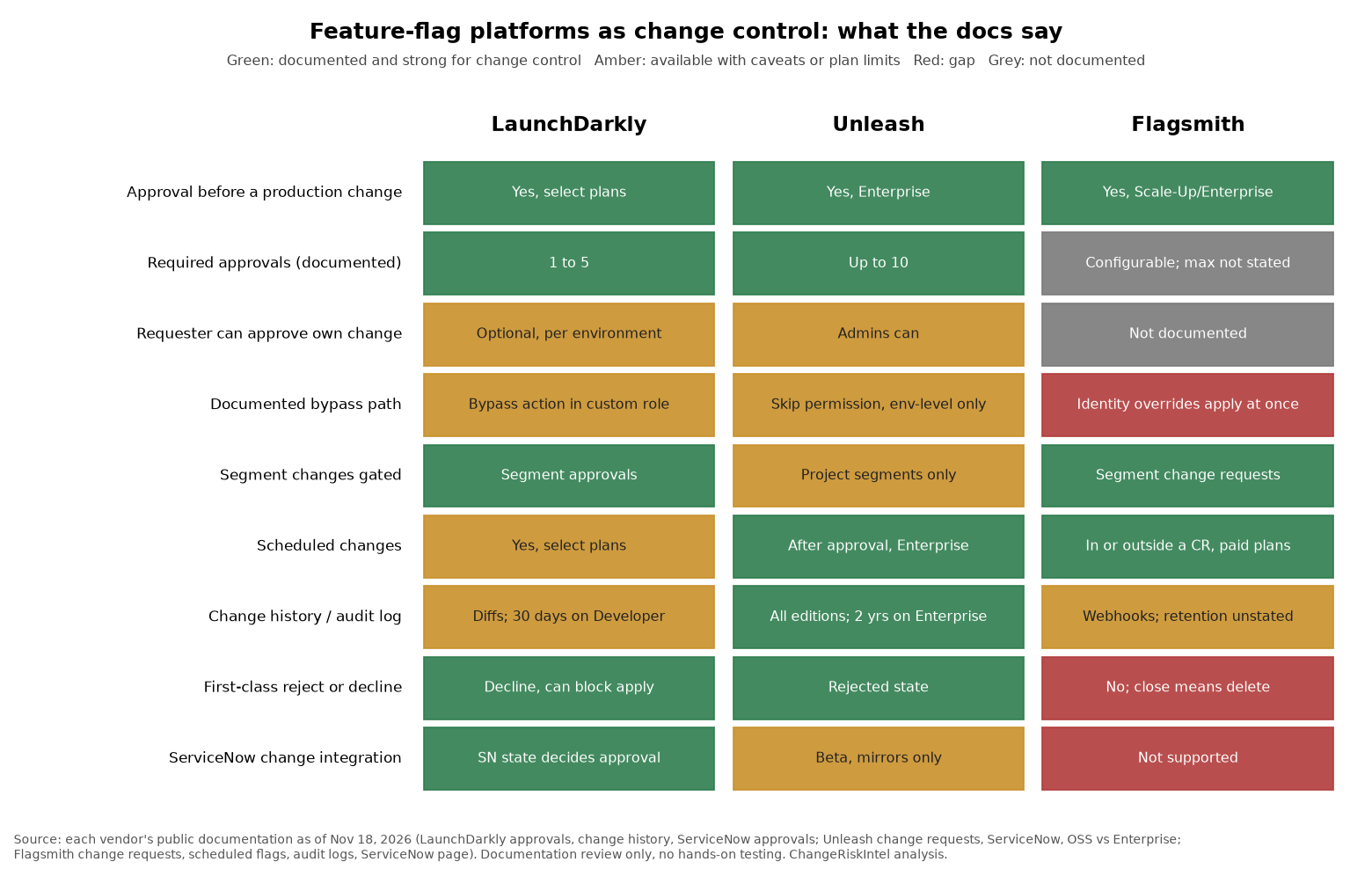
| Question | LaunchDarkly | Unleash | Flagsmith |
|---|---|---|---|
| Approval required before change | Yes, “select plans” (LaunchDarkly) | Yes, Enterprise (Unleash) | Yes, Scale-Up and Enterprise (Flagsmith) |
| Required approvals | 1 to 5 per environment (LaunchDarkly) | Up to 10 | Configurable; maximum not stated |
| Self-approval | Optional checkbox per environment | Admin users can approve and apply their own changes | Not documented |
| Bypass | bypassRequiredApproval custom role action, environment-level | ”Skip change requests” permission, environment-level actions only | Identity overrides apply immediately, outside change requests |
| Segment changes | Segment approvals; separate bypass action | Project segments gated; global segments not | Segment change requests, project-scoped |
| Scheduling | Scheduled flag changes, “select plans” (LaunchDarkly) | Schedule after approval | Scheduled flags in or outside a change request, Scale-Up and Enterprise (Flagsmith) |
| Change history | Member, resource, environment, date, diff; 30 days on Developer plan (LaunchDarkly) | Event log in all editions; Enterprise up to 2 years with IP data (Unleash) | Audit log plus Audit Log Webhooks; retention not stated (Flagsmith) |
| Reject outcome | Decline; can block apply if any reviewer declines | Rejected state | None; closing means deleting |
| ServiceNow | Approval requests create standard change requests; ServiceNow state decides approval (LaunchDarkly) | Beta (8.1); mirrors change requests as standard changes; ServiceNow approvals don’t affect Unleash (Unleash) | “Does not currently support” (Flagsmith) |
LaunchDarkly: strongest ITSM handoff, most plan-gated
LaunchDarkly’s approvals work like pull request reviews. When an environment requires them, “the flag, AgentControl config, experiment, or segment state does not change until a reviewer approves and applies the change” (LaunchDarkly approval settings). Each environment sets the approval count (one to five), whether requesters can review their own request, and whether a single decline blocks the change. Approvals can also be limited to flags carrying specific tags, which is a reasonable way to gate only customer-facing flags.
The bypass path is explicit. A bypassRequiredApproval action in a custom role lets a member or service token skip approval for flags and experiments, with a separate action for segments. That gives an auditor a named permission to review.
The ITSM handoff is the differentiator. With the ServiceNow approvals integration on, “all approval requests created in a LaunchDarkly environment generate corresponding ServiceNow standard change requests,” and LaunchDarkly uses the state of that change request to decide whether the proposed change counts as approved or declined (LaunchDarkly ServiceNow approvals). Of the three, it is the only documented setup where the ITSM record holds the decision.
Weakness: almost everything a CAB cares about is plan-gated. Required approvals, scheduled changes, unlimited change history and the ServiceNow integration are each documented as available on “select plans.” The ServiceNow integration requires an existing standard change template, works only with SaaS ServiceNow, and “cannot” be used in any environment that uses workflows or custom approvals. The scheduled-changes page also doesn’t say how scheduling interacts with approvals, so confirm that before you rely on it for window-bound changes.
Unleash: deepest approval workflow, mirror-only ITSM sync
Unleash change requests turn every flag status or configuration change in a protected environment into a draft that must be reviewed (Unleash change requests). The lifecycle is the most complete of the three: Draft, In review, Approved, Scheduled, Applied, Cancelled and Rejected. Up to 10 approvals can be required. Editing a request that is in review revokes its existing approvals, which closes a common loophole.
Scheduling is built for change windows. An approved request can be scheduled “during a maintenance window or a period of low traffic,” and Unleash suspends a scheduled request if the flag it touches was archived, or a strategy, segment or variant it depends on was changed in the meantime. One detail to brief your team on: if change requests are later disabled for the environment, an already scheduled request “will still be applied as scheduled” unless someone rejects it.
The bypass is a “skip change requests” permission that covers environment-level actions only. Feature-level actions like archiving or deleting a flag still require a change request even for users with skip permission. The event log is in all editions, and Enterprise adds IP address data and up to two years of retention (Unleash OSS vs Enterprise). Events can be exported as CSV or JSON.
Weaknesses: two separation-of-duties gaps and a one-way ITSM sync. Admin users “can approve and apply their own changes,” and global segments bypass change requests entirely, since only project segments go through review. The ServiceNow integration, released in 8.1 and still described as beta (Unleash blog), creates a standard change and updates its stage, but “approvals or rejections in ServiceNow do not affect Unleash” (Unleash ServiceNow integration). It is an audit trail, not an approval gate. It also tracks only change requests created after you turn it on, and disabling and re-enabling it leaves gaps. Change requests themselves are an Enterprise feature, so the open-source edition has no approval gate.
Flagsmith: solid gating, gaps at the edges
Flagsmith offers feature change requests and segment change requests on its Scale-Up and Enterprise plans (Flagsmith change requests). With feature change requests on, a request is required to update an environment default or create or update a segment override, and the API enforces it: direct publish calls are rejected with a 409 Conflict. Segment change requests hold proposed rule edits as a draft, so live evaluation doesn’t change until the request is published, and Flagsmith keeps a revision of the previous rules.
Scheduling can happen inside a change request or, when change requests aren’t enforced, directly from the flag editor (Flagsmith scheduled flags). Audit events can be streamed to your own systems through Audit Log Webhooks with an HMAC signature, which helps if your evidence store is a SIEM rather than the vendor dashboard (Flagsmith audit logs).
Weaknesses: three, all at the edges. “Identity overrides are applied immediately,” so per-user changes skip the four-eyes workflow even in a protected environment. There is “no first-class rejection flow”: closing a request means deleting it, which leaves a gap in the record of what was proposed and refused. And Flagsmith’s ServiceNow page says it “does not currently support integrating with ServiceNow,” so any ITSM link has to be built on webhooks. The audit log page also doesn’t state retention periods.
How should a CAB classify flag changes?
Both ServiceNow integrations above create standard changes. In ITIL terms that means pre-authorized, low-risk work done the same way every time. That fits a routine percentage bump on a well-understood flag. It doesn’t fit a kill switch thrown during an incident, or a targeting change that exposes a new payment flow to all customers.
A workable split:
| Flag change | Suggested change type | Evidence to keep |
|---|---|---|
| Ramp step inside an approved rollout plan | Standard change, pre-approved by the rollout plan | Flag platform approval or change request, plus the plan link |
| New flag turned on for external users | Normal change | Flag approval, test evidence, rollback (flag off) owner |
| Targeting or segment rule edit affecting many users | Normal change | Segment diff, approver, scheduled time |
| Kill switch during an incident | Emergency change, reviewed after | Bypass permission holder, incident link, event log entry |
| Identity-level override for one tester or account | Out of scope, or logged only | Platform audit log |
The tool should match the policy. If your policy calls kill switches emergency changes, someone holds the bypass permission, and that permission is on the access review list. Our change risk score tool can help rate where a given flag change falls, and for broader ITSM tooling context see our ServiceNow vs Jira Service Management change comparison and the tools comparisons hub.
What to do about it
- Inventory who can change production flags. List everyone with direct write access, bypass or skip permissions, and admin roles in each production environment. On Unleash, treat the Admin role as a self-approval right.
- Turn on approvals for production, and check the plan. All three gate approvals behind paid tiers. Confirm what your contract includes before writing a control that depends on it.
- Close the documented gaps with policy. Flagsmith identity overrides and Unleash global segments skip review by design. Either restrict who can make them or log them as out-of-scope changes.
- Decide which system holds the decision. With LaunchDarkly’s ServiceNow integration the change record decides. With Unleash’s beta, the flag platform decides and ServiceNow records. With Flagsmith, you build the link. Write that down so auditors don’t assume more than the integration does.
- Export the history on your retention schedule. Don’t rely on vendor retention you haven’t confirmed, especially LaunchDarkly’s 30 days on its Developer plan or Flagsmith’s unstated retention. Stream or export events to your own store.
- Map flag changes to change types. Use a split like the table above so a ramp step isn’t treated like a new feature launch, and a kill switch is reviewed after the fact.
FAQ
Is a feature flag change a change under ITIL?
It changes production behavior, so most change policies should treat it as one. That doesn’t mean every flip needs a CAB. Routine ramp steps inside an approved plan fit the standard change model, while new exposures and incident kill switches need normal or emergency handling.
Which feature-flag platform integrates with ServiceNow change management?
LaunchDarkly documents a ServiceNow approvals integration that creates standard change requests and uses their state to approve or decline flag changes. Unleash 8.1 has a beta integration that mirrors change requests into ServiceNow but doesn’t take approvals back. Flagsmith says it does not currently support ServiceNow.
Can the person who made a flag change approve it?
On LaunchDarkly, only if the environment allows requesters to review their own requests. On Unleash, Admin users can approve and apply their own changes. Flagsmith’s documentation doesn’t state a self-approval rule, so check it in your own configuration.
Do open-source editions include approval workflows?
Unleash documents change requests as an Enterprise feature, though the event log is available in all editions. Flagsmith documents change requests on its Scale-Up and Enterprise plans. Confirm the edition before relying on approvals as a control.
Sources
- LaunchDarkly: Approvals
- LaunchDarkly: Configuring approvals for an environment
- LaunchDarkly: Scheduled flag changes
- LaunchDarkly: Change history (formerly audit log)
- LaunchDarkly: ServiceNow approvals
- Unleash: Change requests
- Unleash: ServiceNow integration
- Unleash: OSS and Enterprise comparison
- Unleash: DORA compliance for feature flags
- Unleash blog: How do feature flags support ICT change management under DORA?
- Flagsmith: Change Requests
- Flagsmith: Scheduled Flags
- Flagsmith: Audit Logs
- Flagsmith: ServiceNow Integration
Published November 18, 2026.