ServiceNow AI Change Risk Assessment: What CABs Must Verify
Why this matters right now
On July 23, 2026, ServiceNow shipped Australia Patch 4m, and buried in its 420 problem fixes is a change that reshapes how approvers see risk. Problem fix PRB2026001 adds “an AI-driven question and answer completer that populates both change risk assessments and dynamic schema questions with context-based, accurate answers,” per the ServiceNow Australia Patch 4m release notes. In plain terms: the risk assessment your change advisory board reads is now partly written by a model.
That is a governance event, not just a feature. For years, a change risk rating came from rules a human could inspect. When an AI drafts the assessment and a second AI explains the score in confident prose, the path of least resistance for a busy approver is to rubber-stamp it. The same patch shows why that is dangerous: fix PRB2029102 records that “manual approvers can’t be added to the change and std_change_proposal due to newly enforced ACLs,” per the same release notes. AI risk features and approval-workflow regressions are shipping in the same build. A CAB that trusts the automation without checking the plumbing will miss both.
The four ways ServiceNow scores change risk
ServiceNow does not have one risk engine. It has four mechanisms layered over a decade, and understanding which one produced a number is the first thing a CAB should ask.
- Change Risk Calculator. The base-system default. It “uses predefined properties and conditions to calculate a risk value,” per ServiceNow’s risk assessment documentation. Transparent and auditable, but only as good as the conditions an admin wrote.
- Change Management Risk Assessment. An optional questionnaire that “uses information provided by the end user to assess a risk value,” per the same page. It captures human context the calculator cannot, but it is self-reported by the requester, which is exactly the party motivated to downplay risk.
- Calculated Risk Score. A lookup table mapping impact against success probability. ServiceNow ships “nine records with all the possible mappings for Impact and Success Probability along with their corresponding risk values” in the
sn_chg_probability_risk_lookuptable, per the Calculated Risk Score documentation. Only nine cells means the model is coarse; two very different changes can land in the same box. - Predictive Intelligence. A machine-learning layer that offers “enhanced change risk calculation using machine-learning algorithms” and clustering to suggest standard-change templates, per ServiceNow’s Predictive Intelligence for Change Management docs. It learns from your history, which means it inherits your history’s blind spots.
Those four are not competing options a CAB picks once. In practice they stack: the calculator or lookup produces a base number, Predictive Intelligence adjusts it from history, the requester’s questionnaire adds context, and now the AI completer drafts the whole assessment and explains it. That layering is why approvers so often cannot say where a given rating came from, and it is why the newest release matters. The AI completer does not replace the older mechanisms; it papers over the seams between them with fluent prose, which makes the combined output feel more authoritative than any single layer earned. ServiceNow has kept adding to this stack in 2026: its Now Assist for ITSM release notes from July 9 introduce further change-quality and knowledge-gap automation on the same platform, so the trend toward AI-drafted change artifacts is accelerating, not slowing.
We mapped how much of the actual risk decision each mechanism automates against how much judgment it still leaves to the board.
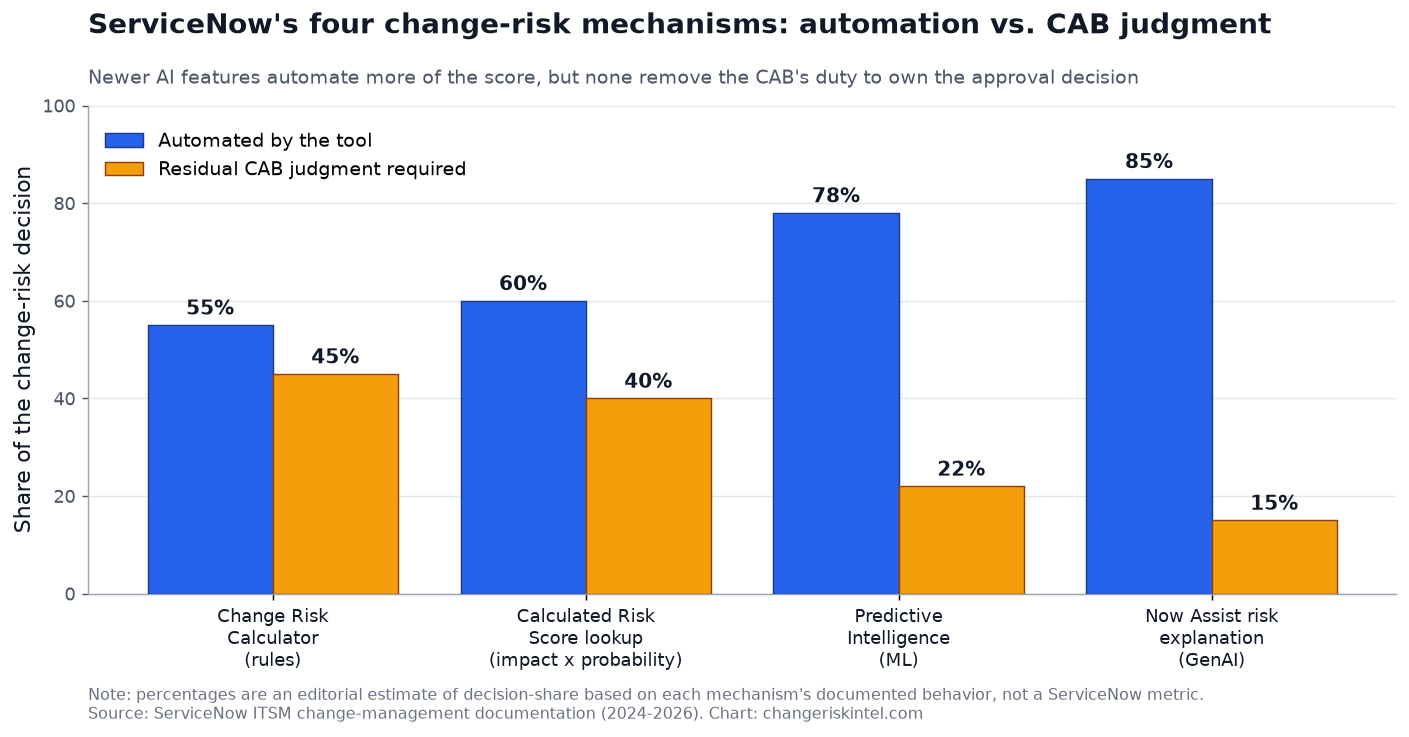
The trend line is the point. Each newer mechanism automates more of the score, and the residual judgment the tool asks of you shrinks from roughly 45% to 15%. That shrinking number is not the same as risk going away. It is accountability being quietly relocated from a documented human decision into a model output, unless the CAB deliberately holds it back.
What the AI actually reads, and where it breaks
The risk-explanation skill is not magic. ServiceNow documents exactly which fields it consumes: “Short description, Implementation plan, Assignment group, Risk, Description, Backout plan, Model type,” plus “similar change requests and the incidents caused by those changes,” per ServiceNow’s change-request risk explanation documentation. It then “appears in a window on the change request record” as an explanation of why the risk is high, medium, or low.
Read that input list again from an attacker’s or a careless requester’s point of view. Every field is free text controlled by the person submitting the change. A thin implementation plan and a vague backout plan produce a confident-sounding explanation built on thin inputs. The model does not know the plan is thin; it summarizes what it is given. ServiceNow’s own documentation is candid that the skill only works after the fact: “the Now Assist icon isn’t available if the risk for the change request hasn’t already been calculated.” The AI explains the score. It does not independently verify the world.
There is also a feedback loop worth flagging to any risk-conscious board. ServiceNow notes that marking an explanation helpful or not “improves the generative AI model and can help to improve future versions of this skill.” That is reasonable product design, but it means approver behavior trains the model. If your team clicks “helpful” to move faster, you are teaching the system that fast, agreeable explanations are the goal.
Did the vendor promise it is safe? No
ServiceNow markets these capabilities around confidence and speed, positioning Now Assist to help stakeholders “approve with confidence” and “strengthen governance for faster, more informed change approvals.” What is missing from the product documentation is as telling as what is present: the risk-explanation reference page states no human-review requirement and no accuracy limit. The vendor is not claiming the AI is correct. It is claiming the AI is helpful. Those are different promises, and a CAB that conflates them is setting itself up to defend a failed change with “the tool said it was low risk,” which is not a defense any auditor or regulator accepts.
This is the same accountability gap we flagged in our CISA BOD 26-04 analysis: regulators increasingly want to see that a human made and can defend the risk decision. An AI-drafted assessment does not satisfy that. It raises the bar, because now you have to show you reviewed the AI’s work, not just that a risk field was populated.
What to do about it
Treat the AI change risk assessment as a fast first draft from a capable but unaccountable junior analyst. Useful, never final.
- Log which mechanism produced the score. Before any approval, record whether the rating came from the rules calculator, the lookup table, Predictive Intelligence, or an AI-completed assessment. You cannot defend a decision whose provenance you did not capture. Our change risk score tool gives you an independent second read to sanity-check the platform’s number.
- Verify the inputs, not just the output. For any medium or high change, the CAB confirms the implementation plan and backout plan are specific and real. The AI explanation is only as good as those fields, and they are requester-controlled.
- Keep a human sign-off field the AI cannot populate. Add an approver-attestation field, checked manually, stating that a named person reviewed the assessment. That is the record that survives an audit.
- Patch-test the workflow, not just the servers. PRB2029102 broke manual approver assignment. After every ServiceNow patch, run a test change through your full approval path before you trust it in production.
- Do not let “helpful” clicks train complacency. Instruct approvers to rate AI explanations on accuracy, not on how quickly they let a change through. You are shaping the model every time.
- Set a floor of changes that always get human risk review. Emergency changes, anything touching a Tier 0 service, and anything with a fresh CVE should never be approved on an AI rating alone. For confirmed-exploited vulnerabilities, pair this with a proper KEV-driven emergency-change path.
For teams still choosing a platform, this is one input among many; our ServiceNow versus Jira Service Management change comparison and the broader change-management pillar cover the trade-offs beyond the AI features.
The honest trade-off
None of this means the AI features are bad. Auto-summarized changes and plain-language risk explanations genuinely speed a CAB drowning in tickets, and Predictive Intelligence surfaces patterns a human reviewer would miss. The weakness is uniform across all four mechanisms: each one is confident, and none of them is accountable. The rules calculator can encode a bad assumption, the lookup table is too coarse, Predictive Intelligence inherits your worst historical habits, and the GenAI explainer summarizes inputs it cannot verify. The board’s job did not shrink when the automation grew. It moved up a level, from scoring the change to auditing the machine that scored it.
Sources
- ServiceNow Australia Patch 4m release notes (PRB2026001, PRB2029102, 420 fixes)
- ServiceNow: Explain a change request risk (Now Assist inputs and behavior)
- ServiceNow: Risk assessment calculation methods
- ServiceNow: Calculated Risk Score lookup table
- ServiceNow: Predictive Intelligence for Change Management
- ServiceNow: Now Assist for ITSM release notes
Frequently asked questions
Published July 29, 2026.