October 2026 Patch Tuesday: A CAB Plan Through Year-End
No affiliate links appear in this article. Every date below is quoted from Microsoft’s own lifecycle, release-health or security pages, linked in Sources.
Table of contents
- Why this matters
- What lands on October 13?
- Why the Secure Boot certificate rollout is a change, not a patch
- What happens between October 13 and November 10?
- How should the year-end freeze treat Patch Tuesday?
- The Q4 change calendar
- What to do about it
- FAQ
- Sources
Why this matters
Microsoft has three Patch Tuesdays left in 2026. The MSRC 2026 release schedule lists them as October 13, November 10 and December 8. Per the Security Update Guide FAQ, each one ships at 10:00 AM Pacific. Most change teams already have those dates on the calendar. Fewer have mapped what else lands on them.
This October is unusually crowded. Microsoft’s Ending Support in 2026 list has 33 entries dated October 13 alone: 10 product retirements, 2 end-of-servicing dates, 16 end-of-support dates and 5 products moving from mainstream to extended support. November 10 adds six more. December has none. The practical effect is that October’s patch window is also a retirement deadline, and the November window is the last chance to fix anything October breaks before most teams freeze for the holidays.
If your CAB treats Patch Tuesday as one recurring standard change, this quarter is the one that breaks that model. Our Patch Tuesday planning guide covers the monthly routine. This piece covers what is different about Q4 2026.
What lands on October 13?
Here are the lifecycle entries that matter most to enterprise change calendars, all dated October 13, 2026 on Microsoft’s list:
- Office LTSC 2021, including Office LTSC 2021 for Mac, plus the standalone LTSC 2021 apps (Access, Excel, OneNote, Outlook, PowerPoint, Project, Publisher, Visio, Word and Skype for Business), reaches end of support. The retail Office 2021 products retire on the same day.
- Windows Server 2012 and 2012 R2, Extended Security Update Year 3 ends.
- Windows 10 Enterprise LTSB 2016 and Windows 10 IoT Enterprise LTSB 2016 reach end of support.
- Windows 11 Home and Pro, version 24H2 reach end of servicing. The Windows message center notes that 24H2 Enterprise and Education stay supported until October 12, 2027.
- Windows Server 2022 leaves mainstream support. The message center says “the October 2026 security update will be the last mainstream support update available for this version.” Security updates continue in extended support through October 14, 2031.
Two clarifications prevent wasted CAB time. First, Windows Server 2022 is not losing security updates. Leaving mainstream support ends non-security fixes and feature work, not patching. Record it as a lifecycle note, not a deadline. Second, consumer Windows 10 is not on this list. Microsoft’s Windows end-of-support page now says enrolled consumer devices get critical and important security updates through October 12, 2027. That extension covers personal-use devices on version 22H2. Devices managed by an organization are excluded, so it doesn’t change your enterprise plan.
The real decision is for the systems that will be unpatched from October 14. Every Office LTSC 2021 install, every Server 2012 host and every LTSB 2016 device still running after this Patch Tuesday has gone from “patched” to “unsupported” in a single release. That needs a decision on record: migrate, isolate, or accept the risk with a compensating control. Our compensating controls register guide shows what auditors expect that record to contain.
Why the Secure Boot certificate rollout is a change, not a patch
The least visible item this quarter is the one most likely to surprise a CAB. Microsoft’s Secure Boot certificate guidance for IT professionals says the 2011 certificates “will begin expiring starting in June 2026 and would expire by October 2026.” Two of the three expired in June. The last one is the Microsoft Windows Production PCA 2011, which signs the Windows boot loader. Microsoft lists its expiry as October 2026. Google Cloud’s Secure Boot expiration guide and its VM certificate table put the exact date at October 19, 2026, six days after Patch Tuesday.
Microsoft’s guidance is blunt about the consequence: “Once these 2011 certificates expire, security updates for boot components will no longer be possible, compromising boot security and putting affected Windows devices at risk and out of security compliance.” It doesn’t say affected devices will stop booting, and you shouldn’t tell your CAB they will. The risk is a silent one. Devices keep running but can no longer receive boot-component security updates.
What makes this a change rather than a patch is how it rolls out. Per the same guidance, a scheduled task runs every 12 hours. It applies the new certificates in order: Windows UEFI CA 2023 to the allowed-signature database first, then the third-party CAs where needed, then the new key-exchange key, and finally a boot manager signed by the 2023 CA. Each step has to succeed before the next. The boot-manager step waits for a natural restart, such as the one after monthly updates. Microsoft estimates “48 hours and one or more restarts” per device. That is a staged, multi-step firmware-trust change with a restart dependency. It deserves its own change record, a pilot group and a verification step, the same as any other ring-based rollout. Our deployment rings guide covers how to structure one.
What happens between October 13 and November 10?
Three things fall inside this window.
October 19: the Secure Boot boot-loader CA expires. Any device not yet carrying Windows UEFI CA 2023 by then is in the “no more boot-component updates” state described above.
End of October: Exchange 2016 and 2019 ESU Period 2 ends. The Exchange Team’s Period 2 announcement says the program runs “from the start of May 2026 through the end of October 2026” and that “there will be no further extensions of this program after that.” The same post says Microsoft is “not committing to actually releasing any SUs during the Period 2 ESU.” If your Exchange Subscription Edition migration is still open, November is the first month with no paid safety net at all.
The optional preview week. Per Microsoft’s Windows release cycle page, optional non-security preview updates are “typically released the fourth week of the month.” The October preview is your first look at the fixes that will ship in the November security update. If you run a test ring, that’s when it should take the preview.
November 10: the last update for Windows 11 23H2 Enterprise and Education. The message center says “the November 2026 Windows security update will be the last update available for these editions,” and recommends moving to 25H2. The same day, Microsoft’s lifecycle list ends servicing for .NET 8 (LTS), PowerShell 7.4 (LTS), Azure IoT Edge 1.5 (LTS) and Windows 11 IoT Enterprise 23H2. It also ends support for the Azure Functions in-process model. .NET 8 and PowerShell 7.4 tend to be buried in application dependencies rather than in the OS inventory, so they’re the ones most likely to be missed.
How should the year-end freeze treat Patch Tuesday?
Most organizations run some form of holiday change freeze. In the US it often starts around Thanksgiving, which falls on November 26 this year, and runs into January. The problem is that December 8 Patch Tuesday lands inside nearly every freeze window. A freeze that blocks it leaves the fleet unpatched until January 12, 2027. A freeze that waves it through without conditions isn’t a freeze.
The workable middle ground is to pre-approve December 8 as a scoped standard change before the freeze starts, with conditions written down:
- Scope: security updates only, deployed through the same rings as November. No feature updates, no optional previews, no lifecycle migrations.
- Gate: your pilot ring completes without a halt condition before broad rollout.
- Exception path: anything exploited in the wild goes through the emergency path regardless of freeze. Our BOD 26-04 decision matrix is a template for that, and the live KEV tracker shows what’s been added and when it’s due.
- Rollback: a named owner who can pause the rollout during the freeze, with a contact path that works during holiday coverage.
The second implication is that the November 10 window does double duty. It’s the last “normal” Patch Tuesday before the freeze. It’s also where anything left over from October should land: the Windows 11 23H2 Enterprise moves, the Secure Boot stragglers and any deferred Office LTSC 2021 retirements. If those slip past November, they either wait until January or need a freeze exception.
The Q4 change calendar
We pulled every Q4 date from Microsoft’s lifecycle, release-health and security pages into one view. The counts come from Microsoft’s Ending Support in 2026 list as published.
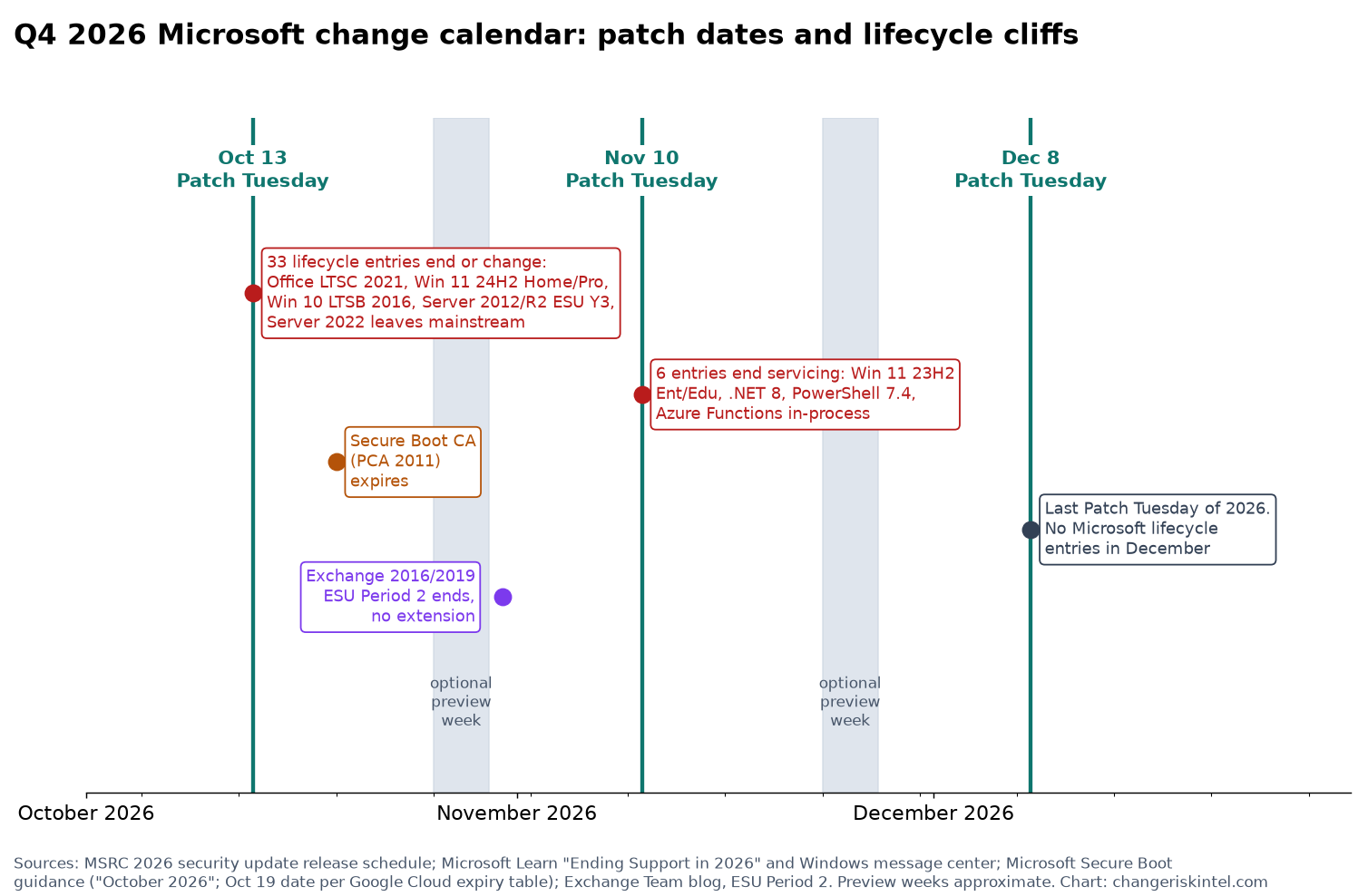
| Date | Event | Lifecycle entries | CAB action |
|---|---|---|---|
| Oct 13 | Patch Tuesday | 33 (Office LTSC 2021, Server 2012/R2 ESU Y3, LTSB 2016, Win 11 24H2 Home/Pro, Server 2022 to extended) | Standard patch change plus a risk decision for every system that becomes unsupported |
| Oct 19 | Windows Production PCA 2011 expires | n/a | Separate staged change for Secure Boot certificates, with verification |
| Late Oct | Optional preview update | n/a | Test ring takes the preview |
| End of Oct | Exchange 2016/2019 ESU Period 2 ends | n/a | Confirm migration is complete or record the residual risk |
| Nov 10 | Patch Tuesday | 6 (Win 11 23H2 Ent/Edu, .NET 8, PowerShell 7.4, IoT Edge 1.5, Win 11 IoT 23H2, Functions in-process) | Last normal window; land all deferred Q4 work |
| Late Nov | Optional preview, Thanksgiving week | n/a | Test ring only; freeze likely begins |
| Dec 8 | Patch Tuesday | 0 | Pre-approved, scoped standard change inside the freeze |
The lopsided distribution is the finding. October 13 carries 33 of the 39 lifecycle entries in Q4. That’s about 85%, all landing on the same day as a security release. December carries none. A team that plans its Q4 capacity evenly across the three Patch Tuesdays will be short in October and idle in December. Our free Patch Tuesday calendar shows the next 12 months of dates, so you can book windows past the freeze.
More templates and process guides are on our change management hub.
What to do about it
- Run the October 13 inventory today. Query for Office LTSC 2021, Windows Server 2012/2012 R2, Windows 10 LTSB 2016 and Windows 11 24H2 Home or Pro. Anything that turns up is unsupported from October 14.
- Record a decision for each unsupported system. The options are migrate, isolate or accept with a compensating control. Each needs an owner and a review date.
- Open a separate change for Secure Boot certificates. Pilot it, confirm devices carry Windows UEFI CA 2023 and the 2023-signed boot manager, and track coverage against the October 19 date.
- Close or document the Exchange ESU gap before November. There’s no Period 3, so an open migration becomes an accepted-risk entry.
- Search application dependencies for .NET 8 and PowerShell 7.4. Both end servicing November 10, and neither shows up in a standard OS inventory.
- Move every deferred Q4 item into the November 10 window. Treat November as the last normal Patch Tuesday of the year.
- Pre-approve December 8 as a scoped standard change before the freeze. Write down its scope, gate, exception path and rollback owner now, while the CAB is still meeting weekly.
FAQ
When are the remaining 2026 Patch Tuesdays?
Per the MSRC 2026 release schedule, October 13, November 10 and December 8, 2026. Updates ship at 10:00 AM Pacific. Microsoft notes dates can change and that it may release out of band when exploitation is spreading.
Is Windows Server 2022 losing security updates in October 2026?
No. It leaves mainstream support on October 13, 2026 and moves to extended support. Microsoft’s Windows message center says it will keep receiving monthly security updates through October 14, 2031, at no additional cost.
Do Windows devices stop booting when the Secure Boot certificates expire?
Microsoft’s guidance doesn’t say that. It says that once the 2011 certificates expire, security updates for boot components will no longer be possible, which leaves devices at risk and out of security compliance. Treat it as a silent security gap, not an outage.
Did Microsoft extend Windows 10 support again?
For consumers, yes. Microsoft’s end-of-support page says enrolled consumer devices on version 22H2 get critical and important security updates through October 12, 2027. Devices managed by an organization are excluded from the consumer program.
Is there another Exchange 2016 or 2019 ESU period after October 2026?
No. The Exchange Team’s announcement says Period 2 runs through the end of October 2026 and that there will be no further extensions. It also says Microsoft isn’t committing to releasing any updates during Period 2.
Should a change freeze block the December Patch Tuesday?
Blocking it leaves systems unpatched until January 12, 2027. A common approach is to pre-approve the December update as a scoped standard change before the freeze, limited to security updates, gated on the pilot ring, with exploited vulnerabilities handled through the emergency path.
Sources
- MSRC: 2026 security update release schedule
- MSRC: Security Update Guide FAQs
- Microsoft Learn: Ending Support in 2026
- Microsoft Learn: Windows message center
- Microsoft Learn: Update release cycle for Windows clients
- Microsoft Support: Secure Boot certificate updates, guidance for IT professionals
- Google Cloud: Microsoft Secure Boot certificates expiration guide
- Google Distributed Cloud: Update Secure Boot certificates on a VM
- Exchange Team: Announcing Period 2 Exchange 2016/2019 ESU program
- Microsoft: End of support for Windows 10
Published October 12, 2026.