Cloud Provider Health Feeds: AWS, Azure, Google, Cloudflare
No affiliate links appear in this article. Every capability claim comes from the provider’s own documentation, linked inline and in Sources, reviewed on October 19, 2026. Provider features change often, so check the linked page before you build against it.
Table of contents
- Why this matters
- What each feed is, in one paragraph
- The capability matrix
- Where each feed falls short
- Mapping provider fields to an incident record
- How to wire these into change control
- What to do about it
- FAQ
- Sources
Why this matters
Most change boards learn about a provider outage the way their customers do: a deploy fails, someone opens the status page, and the change record gets a note after the fact. Every major provider now publishes a machine-readable health feed that can say a service you depend on is degraded in a region you use. Wired into your ITSM tool, that feed can open an incident, pause a pipeline, or block a scheduled change.
The feeds differ on who can call the API, whether events are scoped to you, how long history is kept, and whether you hear about an issue before it’s confirmed. Those differences decide whether a feed can drive an automated freeze. We’ve already covered third-party status page aggregators and how a CAB should review provider incidents after the fact. This piece compares the first-party feeds as integration inputs, with a field mapping you can hand to whoever owns your ServiceNow or Jira instance.
What each feed is, in one paragraph
AWS Health. The AWS Health Dashboard is “available for all AWS customers at no additional cost,” and AWS says all customers “can receive AWS Health events through Amazon EventBridge at no additional cost.” The programmatic API is a different story. The AWS Health API page says you need Business Support+, Enterprise Support or Unified Operations, and accounts without one get a SubscriptionRequiredException. The API runs active-passive across us-east-1 and us-east-2, with a global endpoint for DNS failover.
Azure Service Health. Microsoft describes Service Health as three services: Azure status (the global public view), Service Health (a personalized view of the services and regions you use, covering outages, planned maintenance and health advisories), and Resource Health (per-resource availability, with “minute-by-minute updates”). Notifications land in the Azure activity log, and you build alerts on them with action groups.
Google Cloud Personalized Service Health. Google calls Personalized Service Health “your primary channel for incident information and service health events relevant to your projects.” It has a dashboard, an API at project and organization level, Organization Views, and it writes events to Cloud Logging, where you can alert on them. Its supported products page lists 127 entries.
Cloudflare. Cloudflare offers two things. The public Cloudflare status API returns JSON and “most endpoints… require no authentication.” Separately, Incident Alerts notify account holders when incidents are created, updated and resolved. They’re available on “all Cloudflare plans,” and you can filter them by impact level and component.
The capability matrix
We checked each provider’s documentation against six questions that matter when a feed drives change control. Amber marks a caveat that affects automation; red marks a gap or missing documentation.
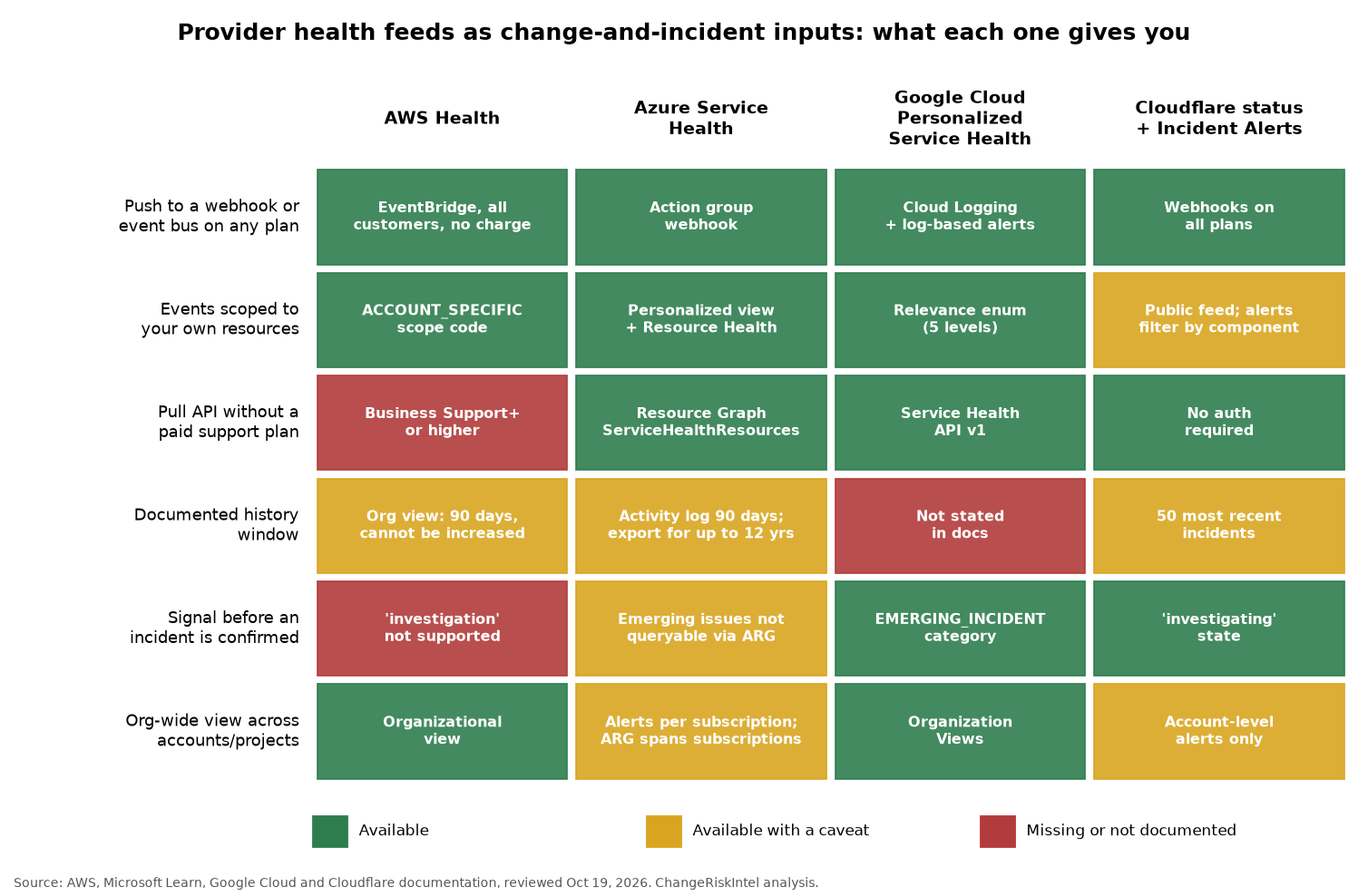
| Question | AWS Health | Azure Service Health | Google Personalized Service Health | Cloudflare |
|---|---|---|---|---|
| Push to a webhook or event bus on any plan | Yes, EventBridge | Yes, action group webhook | Yes, Cloud Logging plus alerts | Yes, webhooks on all plans |
| Events scoped to your resources | Yes, ACCOUNT_SPECIFIC | Yes, personalized plus Resource Health | Yes, five-level relevance | Partly, component filters only |
| Pull API without paid support | No | Yes, Resource Graph | Yes | Yes, no auth |
| Documented history window | 90 days (org view) | 90 days, exportable to 12 years | Not stated | 50 most recent incidents |
| Signal before confirmation | No | Partly | Yes, EMERGING_INCIDENT | Yes, investigating state |
| Org-wide view | Yes | Partly | Yes | Account-level only |
Two patterns stand out. First, push is the cheap path everywhere. No provider charges you to receive events, so a webhook-first design costs nothing in licensing. Second, history is the weak spot. If your auditors ask you to prove that a change was blocked because a provider was degraded, the provider won’t hold that evidence for you past about 90 days. You have to keep it yourself.
Where each feed falls short
Every product here has at least one gap that will bite an integration team.
AWS Health. The API paywall is the big one. If you’re on Developer or Basic support, you can receive events through EventBridge but you can’t query history or backfill after an outage. The EventBridge page adds two more caveats: rules “can only receive notifications for your AWS account,” and “public health events might take up to one hour to start sending after you create an EventBridge rule.” Multi-account estates need organizational view, which requires AWS Organizations with all features enabled. Its events “are available for 90 days before they’re deleted,” and “this quota can’t be increased.” The event schema lists an investigation category, but AWS says it “isn’t supported at this time,” so there’s no early-warning state.
Azure Service Health. Microsoft’s ServiceNow integration guide is the only first-party ITSM recipe in this group, but it tells you to “uncheck Requires authentication” on the Scripted REST API and pass a secret as an apiKey query parameter. Your security team should review that before it goes live. The older ITSM Connector route is going away: Microsoft’s ITSMC page says that in September 2022 it began “the 3-year process of deprecating support for using ITSM actions to send alerts and events to ServiceNow.” Retention follows the activity log, which keeps events “for 90 days and then deletes them” unless you add a diagnostic setting. And the Resource Graph samples page warns that “emerging issues aren’t tied to subscription IDs and as a result can’t be queried via ARG.”
Google Personalized Service Health. It has the richest schema here and the thinnest operational guarantees. None of the overview, logging or API reference pages we reviewed states a retention period. Coverage is limited to the supported-products list, so a dependency on a product outside it gets no personalized events. The event resource also has a noise problem you’ll have to design around: relevance can be UNKNOWN or PARTIALLY_RELATED, and the detailed state can become AUTO_CLOSED or FALSE_POSITIVE. Google says the latter “can change if the incident is reviewed again,” so an auto-closed ticket may need reopening.
Cloudflare. The public status API isn’t account-scoped, and incidents.json returns only “the 50 most recent incidents.” Incident Alerts help, but filters apply only at the moment of each update: “A notification will only be sent if the configured filters match at the time of the incident update. Updates will not be sent retroactively.” An incident that starts as minor and gets upgraded to major could skip a major-only filter for its early updates. Webhook destinations are available on all plans, and accounts without a paid zone can set up to 100.
Mapping provider fields to an incident record
This is the table most integration projects end up building from scratch. It maps each provider’s documented event fields to the incident fields a typical ServiceNow or Jira Service Management setup uses. The provider field names come from the AWS Event reference, the Azure activity log webhook schema, the Google event resource and the Cloudflare status API. The ITSM side is our own mapping.
| Incident field | AWS Health | Azure Service Health | Google Personalized Service Health | Cloudflare status |
|---|---|---|---|---|
| Correlation ID (dedupe key) | arn | trackingId | event name | incident id |
| Short description | eventTypeCode + region | title | latest entry in updates[] | incident name |
| Affected service / CI | service | impactedServices[].ServiceName | eventImpacts[] product | components[] |
| Location | region, availabilityZone | impactedServices[].ImpactedRegions | eventImpacts[] location | component name |
| State | statusCode (open, closed, upcoming) | stage (for example Active) | state + detailedState | status (investigating, identified, monitoring, resolved) |
| Category | eventTypeCategory (issue, accountNotification, scheduledChange) | incidentType | detailedCategory | impact |
| Start time | startTime | impactStartTime | startTime | started_at |
| Work notes | event description (separate call) | communication | updates[] | incident_updates[] |
| Scope to us? | eventScopeCode | subscription scope of the alert rule | relevance | not available |
Three design rules follow from the table.
- Dedupe on the provider’s own ID. AWS ARNs, Azure tracking IDs and Google event names are stable across updates. Use them as the correlation ID so a stream of updates modifies one incident instead of opening ten.
- Map state, don’t just copy it. AWS has three states, Google has six detailed ones, and Cloudflare uses Statuspage’s lifecycle. Pick one internal state model and write the translation explicitly. Google’s
MERGEDstate, which points to aparentEvent, needs a rule of its own. - Treat “scheduled” as a change, not an incident. AWS
scheduledChangeevents and Azure planned maintenance belong in your change calendar as provider-initiated changes. If you open them as incidents, your incident metrics will be wrong and your CAB won’t see them.
How to wire these into change control
The feeds earn their keep when they can stop a change, not just record an outage. Receive by push, store yourself. Send EventBridge, action group, Cloud Logging sink and Cloudflare webhook output to one queue you control. Keep every raw payload for at least as long as your audit period. Azure’s activity log can be exported for up to 12 years, but AWS organizational view tops out at 90 days, and Google doesn’t state a number at all.
Filter by relevance before you page anyone. Use AWS eventScopeCode, Azure’s subscription-scoped alert rules and Google’s relevance field to separate “this affects us” from “this exists.” Microsoft actually recommends selecting all services and all regions when you create the alert, because alerts only fire for regions where you run those services.
Gate deploys on active, relevant events. A pipeline step can check your queue for an open event that matches the target service and region, and refuse to proceed without a documented override. That’s the same idea as a deployment ring halt condition, with the trigger coming from upstream. Score the override with the change risk score tool so the exception record shows why the team went ahead.
Watch the early-warning states. Google’s EMERGING_INCIDENT and Cloudflare’s investigating state are the only documented pre-confirmation signals in this group. They make good soft gates: hold new non-urgent changes, but don’t open a P1.
Give people a human-readable view too. Our free cloud status heatmap shows provider status at a glance, and the cloud and SaaS hub collects outage timelines such as the AWS us-east-1 history.
What to do about it
- Inventory which feeds you already receive. For each provider you depend on, record whether events go anywhere today, who owns the integration, and where the payloads are stored.
- Check the AWS support plan before designing a pull integration. If you aren’t on Business Support+ or higher, build on EventBridge only and plan for no API backfill.
- Review Azure’s ServiceNow webhook security. If you used Microsoft’s recipe, confirm the unauthenticated endpoint is acceptable, rotate the
apiKey, and check whether any legacy ITSM Connector actions still exist. - Store raw events for your audit period. Don’t rely on provider retention. Ninety days won’t cover an annual SOX or SOC 2 test window, and for Google’s feed no window is documented.
- Adopt the field mapping above. Use provider IDs as correlation keys, define one internal state model, and route scheduled maintenance to the change calendar.
- Add a provider-health check to deploy pipelines. Start in warn-only mode for two weeks, measure false positives, then turn it into a gate with a logged override.
- Add the feeds to your vendor list. Pair this with the broader 12 external risk sources list and the tools comparisons hub so feed coverage is reviewed alongside your other monitoring.
FAQ
Do I need a paid AWS Support plan to get AWS Health events?
Not to receive them. AWS says all customers can get AWS Health events through EventBridge at no additional cost, and the dashboard is free. The AWS Health API needs Business Support+, Enterprise Support or Unified Operations. Without one, API calls return a SubscriptionRequiredException.
How long do AWS, Azure and Google keep health events?
AWS organizational view keeps events for 90 days, and AWS says that quota can’t be increased. Azure keeps activity log entries, including Service Health notifications, for 90 days unless you export them. Google’s Personalized Service Health documentation we reviewed doesn’t state a retention period.
Can Azure Service Health alerts create ServiceNow incidents?
Yes. Microsoft documents a webhook that calls a ServiceNow Scripted REST API to create or update incidents. The guide disables authentication on that API and passes an apiKey in the URL, so review it with your security team. Microsoft is deprecating ITSM actions that send alerts to ServiceNow.
Which provider feed warns before an incident is confirmed?
Google’s event schema has an EMERGING_INCIDENT category for events still under investigation, and Cloudflare’s status API reports an investigating state. AWS lists an investigation category but says it isn’t supported. Azure’s emerging issues can’t be queried through Resource Graph.
Is the Cloudflare status API specific to my account?
No. It’s a public, unauthenticated feed of Cloudflare-wide status, and incidents.json returns the 50 most recent incidents. For account-level notifications, use Incident Alerts, which you can filter by impact and component and send to webhooks on any plan.
Should provider maintenance events be logged as incidents or changes?
As changes. AWS scheduledChange events and Azure planned maintenance are provider-initiated changes with known windows. Put them on your change calendar so the CAB sees conflicts. Logging them as incidents distorts incident metrics and hides them from change review.
Sources
- AWS: What is AWS Health?
- AWS: Accessing the AWS Health API
- AWS: Monitoring AWS Health events with Amazon EventBridge
- AWS: Aggregating AWS Health events using organizational view
- AWS Health API Reference: Event
- Microsoft Learn: Azure Service Health overview
- Microsoft Learn: Create Service Health alerts in the Azure portal
- Microsoft Learn: Azure Resource Graph sample queries for Service Health
- Microsoft Learn: Azure Monitor activity log
- Microsoft Learn: IT Service Management Connector overview
- Microsoft Learn: Send Azure Service Health alerts with ServiceNow
- Microsoft Learn: Webhooks for activity log alerts
- Google Cloud: Personalized Service Health overview
- Google Cloud: Personalized Service Health supported products
- Google Cloud: Service Health API, projects.locations.events
- Google Cloud: View Service Health logs
- Cloudflare Docs: Available notifications
- Cloudflare Docs: Configure webhooks
- Cloudflare Status API
Published October 19, 2026.