Closing Patch Changes on Running-Version Evidence
No affiliate links appear in this article. The restart and fixed-build counts come from Microsoft’s CVRF data for the November 2026 release, linked in Sources, and are ChangeRiskIntel’s own tally. The verification commands are quoted from vendor and project documentation; adapt them to your own tooling before relying on them.
Table of contents
- Why this matters
- Where install logs and running code diverge
- What November’s Microsoft data says about restarts
- A closure-evidence table by platform
- Hotpatch gives you two valid builds, not one
- Writing the closure criteria into the change record
- What to do about it
- FAQ
- Sources
Why this matters
Most patch change records close on the deployment tool’s word. The job reported success, the package manager returned zero, the update shows as installed, so the change moves to Closed. That evidence answers “did the install run?” It doesn’t answer “is the vulnerable code still in memory?”
Alpine Linux put the gap plainly in its November 5 openssh-server advisory: “Upgrading the package does not restart a running sshd, so you must do it after.” We noted that lesson in the week-2026-45 recap, and the bug came back a week later as OpenSSH CVE-2026-123158 in week-2026-46. A host that ran apk upgrade and nothing else had the fixed package on disk and the vulnerable daemon still listening.
This isn’t a Linux quirk. Windows holds a security update in a pending-restart state until the device reboots. SQL Server and Exchange keep running the old binaries until their services restart. Kubernetes keeps old pods on the old image until they are replaced. In every case the install record and the running state can disagree for days, and an auditor or incident reviewer will ask which one the change closed on.
NIST SP 800-40 Rev. 4 defines enterprise patch management as “identifying, prioritizing, acquiring, installing, and verifying the installation” of patches. This article is about making that last verb mean the running version, and writing it into the change template so it doesn’t depend on who closes the ticket.
Where install logs and running code diverge
There are four common ways a patch can be installed and still not be in effect.
A long-running process keeps the old code mapped. When a package manager replaces a shared library or a daemon binary, processes that started earlier keep using the old copy until they restart. The needrestart project exists for exactly this: it “checks which daemons need to be restarted after library upgrades.” The DNF equivalent, needs-restarting, “looks through running processes and tries to detect those that use files from packages that have been updated after the given process started,” noting that “processes often need to be restarted to reflect security updates.”
The kernel or microcode only changes at boot. A new kernel package on disk does nothing until the host reboots into it. needrestart has detected obsolete kernels since version 0.8 and outdated Intel and AMD microcode since later releases, according to its README. dnf needs-restarting -r reports whether a reboot is required, with exit code 1 meaning yes and 0 meaning no.
The OS stages the update for the next restart. Windows quality updates install and then wait. Microsoft’s Windows Autopatch timeline shows a day-3 install deadline and a day-5 forced restart, and says “the pending restart period begins when the update is installed.” The Update policy CSP is blunter: “the PC must restart for certain updates to take effect.” Under compliance deadline policies, the grace period counts from the pending restart, not from the install.
The workload runs a different artifact than the one you updated. In Kubernetes, rebuilding an image under the same tag doesn’t change running pods. The Kubernetes images documentation warns that with mutable tags you “might end up with a mix of Pods running the old and new code,” that imagePullPolicy defaults to IfNotPresent for non-latest tags so the kubelet can skip the pull, and that the policy is set when the object is created and not updated later. Digests are immutable; tags are not.
What November’s Microsoft data says about restarts
Microsoft publishes two fields in its CVRF data that are useful for closure: RestartRequired on each security update and FixedBuild, the build number that contains the fix. We tallied both across the 1,093 Microsoft-assigned CVEs first published on November 10, 2026, using the same product grouping as our risk cohorts template.
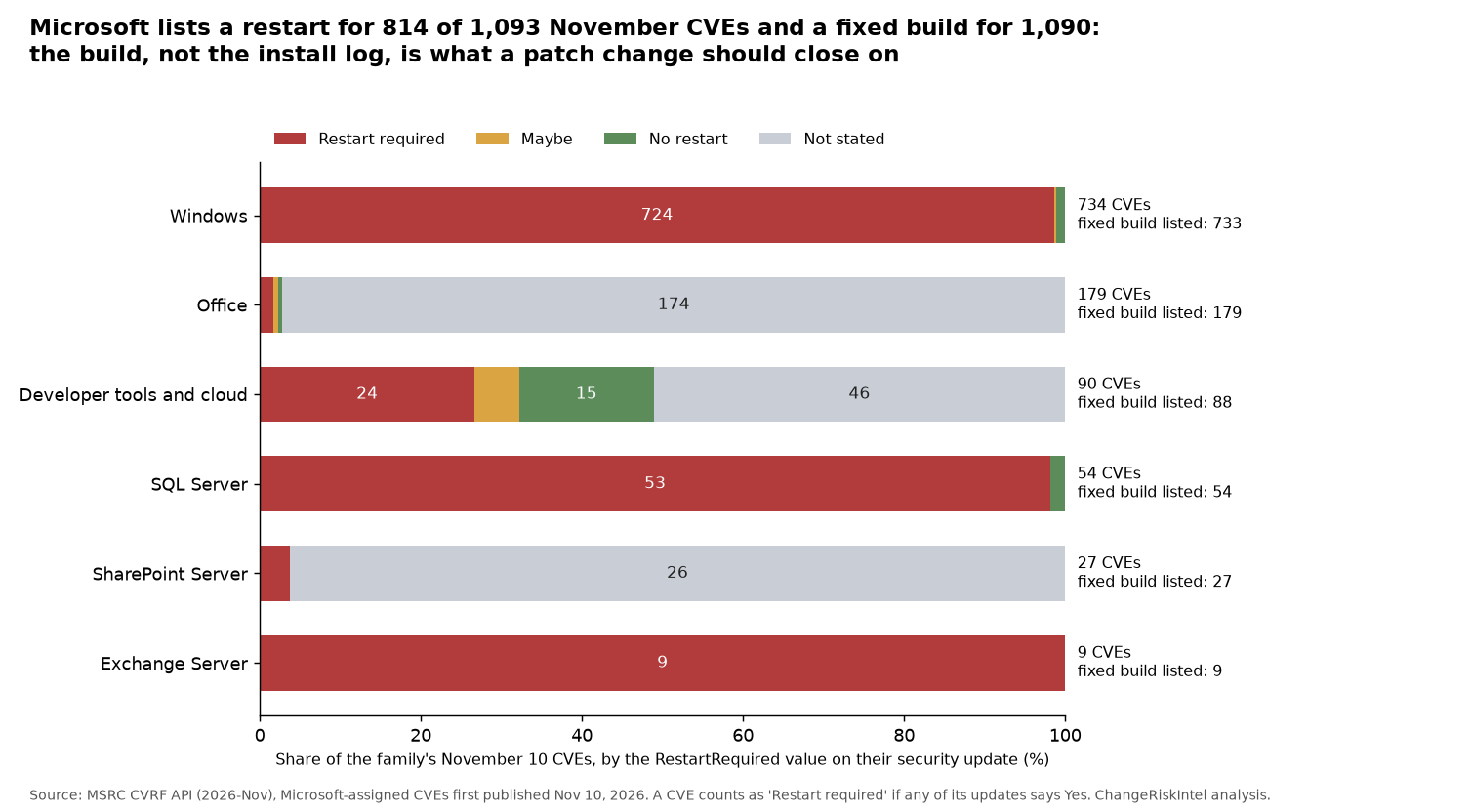
| Product family | CVEs | Restart: Yes | Maybe | No | Not stated | Fixed build listed |
|---|---|---|---|---|---|---|
| Windows | 734 | 724 | 2 | 8 | 0 | 733 |
| Office | 179 | 3 | 1 | 1 | 174 | 179 |
| Developer tools and cloud | 90 | 24 | 5 | 15 | 46 | 88 |
| SQL Server | 54 | 53 | 0 | 1 | 0 | 54 |
| SharePoint Server | 27 | 1 | 0 | 0 | 26 | 27 |
| Exchange Server | 9 | 9 | 0 | 0 | 0 | 9 |
| All | 1,093 | 814 | 8 | 25 | 246 | 1,090 |
A CVE counts as “Yes” if any of its security updates lists a restart. Three things stand out.
- Restarts are the norm for server-side fixes. Every Exchange CVE and 53 of 54 SQL Server CVEs list a restart. For Windows it is 724 of 734 on at least one update path.
- “Not stated” is not “no.” Office and SharePoint updates mostly leave the field empty. The closure check for those is the build number, not an assumption that nothing needed restarting.
- The fixed build is almost always published. 1,090 of 1,093 CVEs carry a
FixedBuildvalue. That gives the change record a target to compare against: SQL Server 2025’s fix for CVE-2026-116945 is build 17.0.5045.3 (KB5129299), and Exchange SE’s fix for CVE-2026-118207 is 15.02.2562.057 (KB5133453).
A closure-evidence table by platform
This is the table we’d attach to a standard patch change template. The middle column is what most records close on today. The right-hand columns are what should close them.
| Platform | What the install record shows | What proves the fix is running | How to check | Reference |
|---|---|---|---|---|
| Linux daemon (sshd, nginx, etc.) | Package version on disk | Daemon restarted after the upgrade; no stale libraries | needrestart -b (batch mode) or dnf needs-restarting -s; for the Alpine case, sshd -T showing the fixed setting | needrestart, DNF, Alpine |
| Linux kernel and microcode | New kernel package installed | Host booted into the fixed kernel | dnf needs-restarting -r exit code 0; needrestart kernel check | DNF, needrestart |
| Windows | KB shows as installed | No pending restart; OS build at or above the CVRF FixedBuild for the path used | Endpoint tool’s pending-restart state plus reported OS build | CVRF, Autopatch |
| SQL Server | CU or GDR installer succeeded | Instance reports the fixed build | SELECT SERVERPROPERTY('productversion') | Microsoft Learn |
| Exchange Server | SU installer succeeded | Build matches the SU, not just the CU | Not AdminDisplayVersion, which shows the CU only; use Microsoft’s SU-level methods | Exchange build numbers |
| Containers on Kubernetes | New image pushed to the registry | Every running pod reports the fixed image digest | Compare each container’s image ID in pod status to the fixed digest; pin by image@sha256: | Kubernetes |
The Exchange row is worth a second look. Microsoft’s build numbers page says AdminDisplayVersion “shows the Cumulative Update version only; it does not show the installed Security Update (SU) or Hotfix Update (HU).” A closure check built on Get-ExchangeServer alone would show the same build before and after November’s SU. The same page lists Exchange SE RTM Nov26SU as 15.2.2562.57, which matches the CVRF fixed build.
The needrestart README also flags its own limits. Processes inside containers “might not be possible to restart” through Sys-V or systemd, and interpreter scanning for Java, Perl, Python and Ruby is described as heuristic. Treat a clean needrestart run as strong evidence for host daemons and weaker evidence for anything containerized or interpreted.
Hotpatch gives you two valid builds, not one
November’s data has a wrinkle for Windows. 655 of the 1,093 CVEs also have a “Security Hotpatch Update” path, and every one of those 2,413 hotpatch entries lists RestartRequired: No. The hotpatch path has its own fixed build. For Windows DNS CVE-2026-88218 on Windows Server 2025, the regular update (KB5131080) lists build 10.0.26100.33822 with a restart, while the hotpatch (KB5131077) lists 10.0.26100.33730 with no restart.
So “OS build at or above the fixed build” depends on which path the host is on. A hotpatched server at .33730 is fixed. The same check against .33822 would flag it as unpatched. The change record needs to say which path each host group uses.
Hotpatch also doesn’t remove restarts. Microsoft’s hotpatch documentation says baseline months “require you to restart your machine,” that a typical year has four baselines and eight hotpatch months, and that non-security updates, .NET updates and drivers or firmware still need a restart. The Windows Server team’s risk-based patching guidance asks for “evidence of successful installation” on every response path. For hotpatched hosts, that evidence is the hotpatch build. For everything else, it’s the post-restart build.
Writing the closure criteria into the change record
Put the checks into the change template rather than a runbook nobody opens at 2 a.m. A closure block for a standard patch change can be short:
| Field | Example entry | Closes the change when |
|---|---|---|
| Fixed version or build | Exchange SE 15.2.2562.57; SQL Server 2025 17.0.5045.3 | Every in-scope host reports it or higher |
| Update path per host group | Hotpatch (Server 2025 ring 1); cumulative update (all others) | Path recorded, so the right build is checked |
| Restart evidence | needrestart batch output; no pending restart in endpoint tool | Zero outstanding services or reboots |
| Running-version evidence | Query output, pod image IDs or sshd -T output, timestamped | Collected after the restart, not before |
| Exceptions | Hosts that can’t restart yet, with owner and date | Each one has a compensating control or a follow-up change |
| Verified by and when | Name and timestamp | Different person or automated job from the implementer |
The exceptions row matters most. A host that installed but can’t restart until next weekend is still exposed. It shouldn’t be lumped in with the closed hosts. Record it the way you’d record any deferral, using a compensating controls register and the deferral evidence described in risk-based patching audit defensibility.
Running-version evidence is one closure test, not the only one. Our Ivanti Connect Secure piece covered why an appliance also needs an integrity check before the change counts as recovery, and the N-able N-central piece covered a vendor fix that turned out to be incomplete, which moved the target build. Both are reasons to record the exact fixed build in the change and re-check it when the vendor revises its advisory.
What to do about it
- Add a closure block to the standard patch template. Fixed build, update path, restart evidence, running-version evidence, exceptions and verifier, as in the table above.
- Pull the fixed build from the vendor, not the tool. For Microsoft, take
FixedBuildfrom the CVRF document for each product. For Linux, take the fixed package version from the distro advisory, then confirm the running process with needrestart or needs-restarting. - Never close on
Get-ExchangeServeralone. It shows the CU, not the SU. - Pin containers by digest and check pods, not registries. A pushed image proves nothing about what’s running.
- Treat “installed, pending restart” as open. Report those hosts as exceptions with an owner and a restart date. Route KEV items through the BOD 26-04 decision matrix so the deadline applies to the restart, not the install.
- Stage restarts the way you stage installs. If restarts are the risky part, use the same rings described in deployment rings and staged rollouts. The CISA KEV live tool shows which items carry federal deadlines, and more templates live on the change management hub.
FAQ
Does a successful package install mean the vulnerability is fixed?
Not by itself. Processes that started before the upgrade keep running the old code until they restart, and kernels only change at boot. Alpine’s November 2026 openssh advisory says upgrading the package does not restart a running sshd. Close the change on a restart check and the running version.
How do I check for services that need a restart on Linux?
On Debian, Ubuntu and similar systems, needrestart lists daemons using outdated libraries and has a batch mode for scripts. On Fedora and RHEL-family systems, dnf needs-restarting -s lists affected systemd services and -r reports whether a reboot is required.
Why doesn’t AdminDisplayVersion confirm an Exchange security update?
Microsoft’s Exchange build numbers page says AdminDisplayVersion shows the cumulative update only, not the installed security update or hotfix update. Use Microsoft’s SU-level build check and compare it to the fixed build in the security update data.
Does Windows hotpatch remove the need to verify restarts?
No. Hotpatch updates install without a restart, but they have their own fixed build, and baseline months, non-security updates, .NET updates and drivers still need a restart. Record which path each host uses and check the matching build.
Sources
- Alpine Linux: Security advisory, openssh-server password authentication bypass (November 5, 2026)
- needrestart on GitHub (liske/needrestart)
- DNF plugins core: needs-restarting
- Kubernetes documentation: Images
- NIST SP 800-40 Rev. 4: Guide to Enterprise Patch Management Planning
- MSRC CVRF API: November 2026 security updates document
- Microsoft Learn: Windows quality update end user experience (Windows Autopatch)
- Microsoft Learn: Policy CSP - Update
- Microsoft Learn: Enforce compliance deadlines with policies
- Microsoft Learn: Hotpatch for Windows Server
- Microsoft Learn: Find the version and edition of your SQL Server Database Engine
- Microsoft Learn: Exchange Server build numbers and release dates
- Microsoft Windows Server Blog: Building a risk-based patching response for Windows Server (November 2, 2026)
Published November 25, 2026.